

Pika Labs vs InVideo: Which AI Video Maker Delivers the Best Results?
So here we are in 2025, drowning in AI video generation tools. Feels like every other day there’s a shiny new “AI video generator” landing in my inbox. And honestly? Half of them are vaporware—pretty websites, zero reality. But two names actually stick: Pika Labs and InVideo.
Both are AI video generators. Both promise to let you create videos faster than your coffee brews.
Both swear they’ll give you “better results.” But if you’re like me—juggling client deadlines, half-baked YouTube ideas, and that eternal “I should make more content” guilt—then the question isn’t if you should use them, but rather which is better for you: vlog or blog.
It’s which one actually works without making you want to throw your laptop at the wall?
Let’s get into the comparison: Pika Labs vs InVideo.
AI Video Generation: The Big Picture
Video creation used to be pain. You had to storyboard, shoot, edit, add sound, fix frame rate issues… basically an entire Hollywood pipeline just to create a 30-second clip for Instagram.
Now? With AI writing and video generation, you can literally type a simple prompt like “cinematic feel, a child running through snowy mountains, sound of wind”—and boom, you’ve got ai generated videos.
Both Pika Labs and InVideo are cashing in on this shift. They’re video generators that take your input (text, images, even random ideas scribbled at 3 AM) and spit out engaging videos in minutes. The catch? They do it differently.

Image to Video: Turning Still Pics Into Motion
This is one of my favorite things about modern AI—feeding an image into the machine and watching it come to life.
👉 Side note: If you’re into cinematic stuff, Pika wins here. If you’re making a fast YouTube ad with stock music? InVideo.
Text to Video: From Prompts to Movies
This is where the magic really happens.
👉 If you’re trying to create videos out of wild ideas, Pika Labs wins. If you just want to turn a sales page into a video ad? InVideo’s your tool.
Create Videos: The Workflow

So yeah, Pika = creative playground, InVideo = structured workflow.
Pika Labs Overview
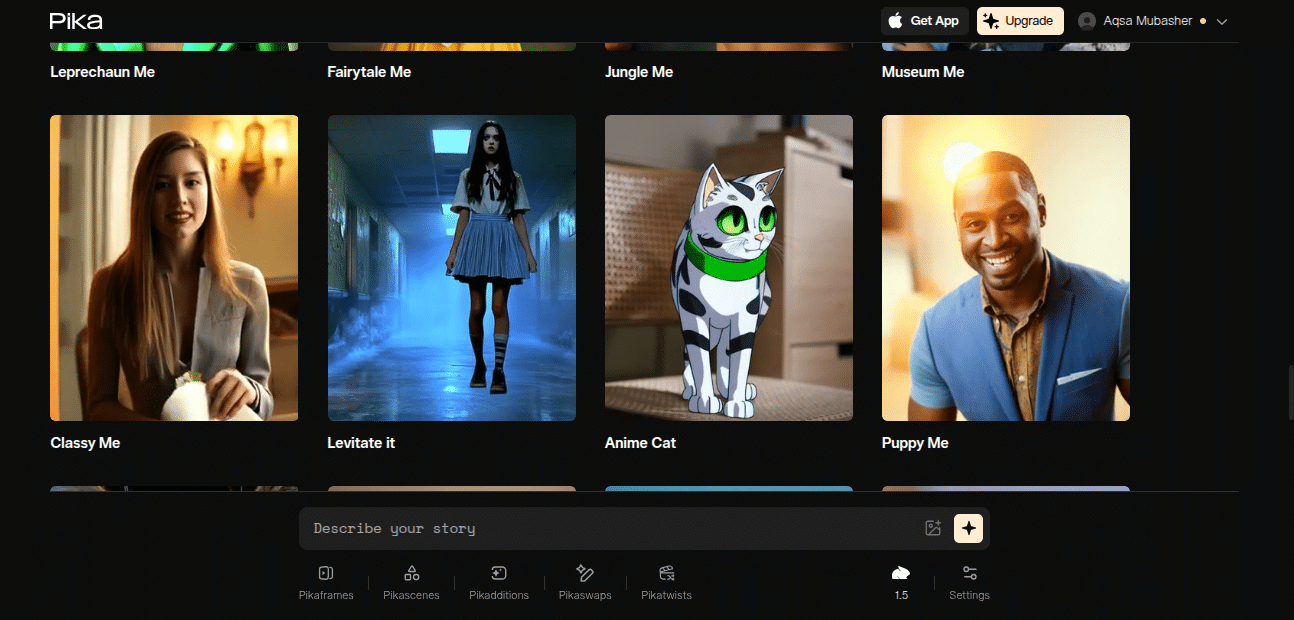
Pika Labs is like that cool kid in class experimenting with wild ideas. Their site is minimal, their community’s buzzing on Discord, and the tool itself feels like a playground. If you’re into motion, style, stories, characters, Pika gives you creative control.
But yeah, it’s not perfect. Sometimes the output glitches, sometimes prompts misfire. That’s AI life.
Features:
- Text to video with prompt + negative prompt control.
- Image to video (animate still images).
- Cinematic feel outputs.
- Real-time tests with “Pika Live.”
- Aspect ratio options for TikTok, YouTube, Insta.
- Speedy output but sometimes errors.
AI Capabilities:
- Animation-first.
- Handles motion, style, scene creation.
- Lets you mess with frame rate, aspect ratio, cinematic feel.
- Good for experimental creators, storytellers, animators.
Pros
- Creative freedom.
- Perfect for cinematic or experimental projects.
- Great control with prompts.
- Community-driven.
Cons
- Can be buggy.
- Learning curve with prompts.
- Not “business-polished.”
InVideo Overview

InVideo is way more polished, more “business-ready.” Their website screams “marketers, come here.” Tons of plans, tons of templates, tons of stock resources. If you need 100 promo videos this week? InVideo. If you want to sign up and churn output fast? InVideo.
Features:
- Templates galore (YouTube, Facebook, Instagram, ads).
- AI-powered script-to-video.
- Voiceovers (built-in, no need to record).
- Stock media library (tons of visuals + sound).
- Collaboration tools.
- Community + customer support.
AI Capabilities:
- Smart at picking stock footage + sound to match your script.
- AI voiceovers (multiple accents, tones).
- Great for sales teams, startups, agencies that need volume over artistry.

Pros
- Templates make it dead simple.
- Perfect for sales, YouTube, ads.
- Fast, predictable, no headaches.
- Voiceovers included.
Cons
- Feels cookie-cutter.
- Less creative freedom.
- Needs internet (cloud-only).
👉 Think of Pika like an artist. InVideo like a marketing intern who never sleeps.
Video Quality: Who Wins?
Depends on what you call “quality.”
So it’s power vs polish.
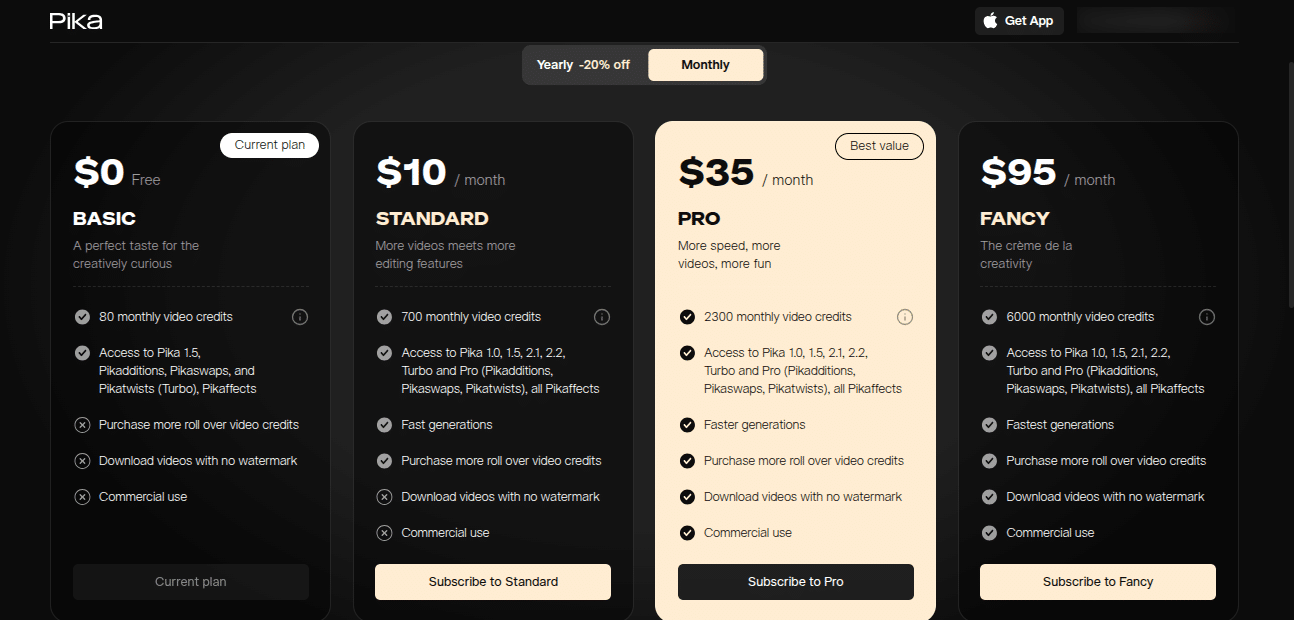
Pricing Plans
Pika Labs: Currently more affordable, with free testing and paid tiers for higher resolution + longer outputs.
InVideo: Pricing is higher, but you’re paying for stability, templates, and customer support. Starts free, Pro plan around $35/mo.
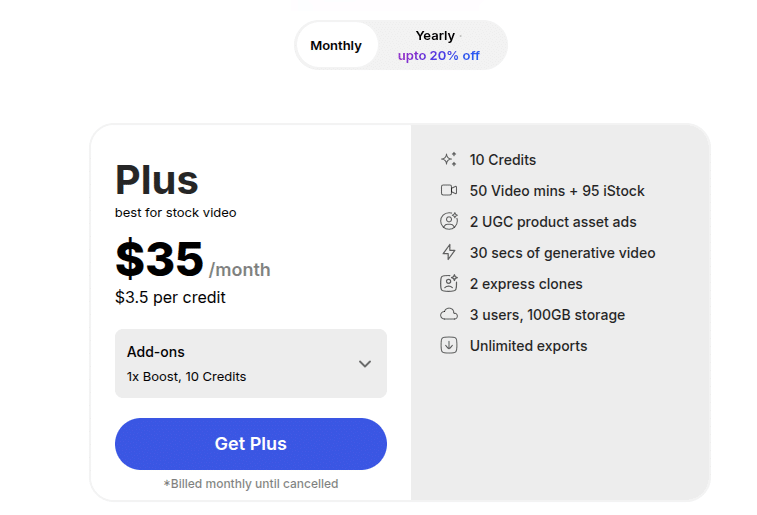
👉 Pricing page: InVideo Pricing
Final Verdict: Pika Labs vs InVideo
So which is better? Honestly depends who you are:
I’ll say this: I use both. Pika when I want to impress with “wow” factor. InVideo when I need 10 explainer videos by Friday.
FAQs
Q1: Is Pika Labs free?
Yes, they’ve got free credits, but serious use = paid.
Q2: Can InVideo replace pro editing software?
Nah. It’s great for quick projects, not Hollywood films.
Q3: Which makes better YouTube videos?
If you’re storytelling → Pika. If you’re making “top 10 lists” → InVideo.
Q4: Does Pika Labs allow more control than InVideo?
Yep. Negative prompts, frame rates, styles = more control.
Q5: Which tool is faster?
InVideo. It’s template-based, so you’ll generate videos quickly without testing prompts.
Side Note Before We Wrap
I’ve tested both on real projects:
Moral? Test before you publish.
