

Stealthwriter Review: Does It Really Bypass AI Detection Successfully?
If you’re here, you’ve probably already got a pile of AI-generated content sitting in your drafts. Maybe ChatGPT or Jasper pumped out 2000 words for you in, what, three minutes?
And now you’re sweating because every “leading AI detection tool” (Originality AI, GPTZero, Crossplag—pick your poison) is screaming: 100% AI-generated.
Enter Stealthwriter.
They claim—big bold claim—that their tool “effectively removes AI detection” and turns your machine-like text into human-like writing.
Some call it an AI humanizer, some call it the worst tool on earth (I’ll get into that). But the question is: does it actually work, or is it just another shiny button that eats your money faster than Starbucks eats your salary?
Let’s dive. And yes, I actually tested it. Coffee shop vibes, messy Wi-Fi, and a stubborn essay draft.
What is Stealthwriter?
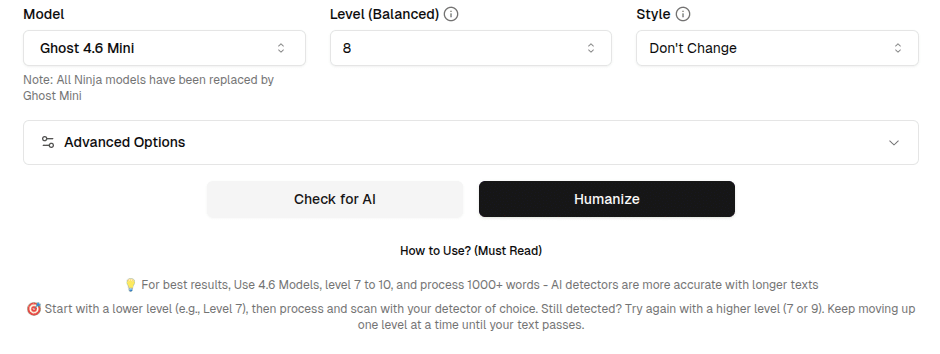
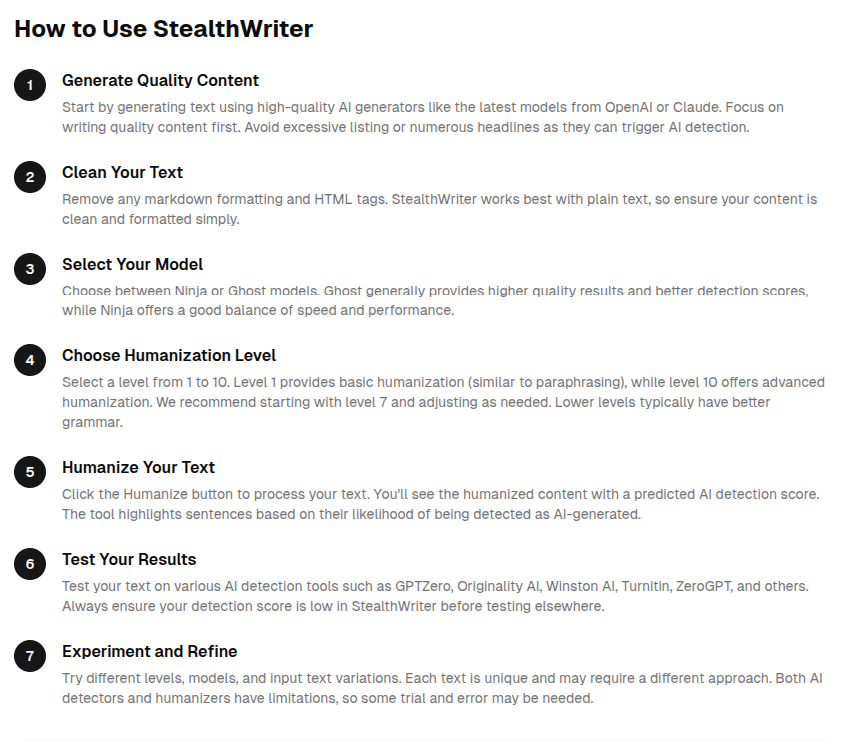
Stealthwriter is basically an AI humanizer. You throw in AI written text—something straight from ChatGPT, Claude, or wherever—and it spits out a rewritten text that’s supposed to look like a real human wrote it.
Here’s the marketing line: “Stealthwriter effectively removes AI detection and produces human-like writing.”
Sounds good on paper. But is it too good to be true?
My First Test with Stealthwriter
So, I grabbed a chunk of AI-generated text from ChatGPT (ironically enough). It was about SEO strategy—nothing too fancy, just one of those listicle-style “10 SEO tips” things.
Then, I ran it through Originality AI.
👉 Result: 77% human.

I’m not gonna lie, I almost spit my coffee. That’s… pretty solid. GPTZero also dropped its red flags way down. Was it perfect? No. Some sentences sounded a little too polished, like a grammar checker went on a power trip. But hey—compared to the raw AI output, it was night and day.
Side note: It did add a few weird phrases. For example, it turned “SEO is crucial for businesses” into “SEO, in a sense, can be seen as the heartbeat of business survival.” Like, chill Stealthwriter, I wasn’t writing a Shakespearean drama.
But still—passable.
Features of Stealthwriter
Here’s what the tool throws at you (their selling points, plus my 2 cents):
Stealthwriter and AI Detectors
This is the big selling point, right? Can it actually dodge the leading AI detection tools?
From my experience:
Side note: Nothing is bulletproof. AI detectors keep updating their algorithms. So while Stealthwriter works today, who knows what happens next month? It’s a bit of a cat-and-mouse game.
Effectively Removes AI Detection?
Do I think Stealthwriter “effectively removes AI detection”?
Short answer: yes… most of the time.
Longer answer: It depends on your content type.
It’s not magic. But if you’re worried about AI detection tools flagging your stuff, it’s one of the better AI humanizers I’ve tried.
Bypassing AI Detection
Let’s cut through the buzzwords. Stealthwriter is basically playing a game of:
AI writes → Detector flags → Stealthwriter rewrites → Detector shrugs.
That’s it. No fancy voodoo. Just solid rephrasing tech.
When I tested it against GPTZero, it wasn’t 100% consistent. Sometimes GPTZero still said “your text looks AI-ish.” But against Originality AI (the one everyone’s scared of because it’s strict), it worked way better.
So, does it bypass AI detectors? Yes, but not flawlessly.
Stealthwriter vs Other AI Humanizers
Let’s be real—Stealthwriter isn’t the only player.
Top 5 AI Headshot Generators 2024 (Crazy tools) – Discover the best platforms for generating professional AI headshots.
Unlike Stealthwriter, some tools either under-deliver or just straight up ruin your writing. Stealthwriter, at least, kept most of my ideas intact.
That said: some users call it the “worst tool” because it can over-humanize text and add fluff. Honestly? Fair point.
Plans, Pricing & Free Version
Pricing is… meh. It’s not crazy expensive, but it’s not dirt cheap either.

Tip: Don’t commit to the highest tier until you test the free version.
Customer Support
Customer support exists. (That’s the nicest way I can put it).
I had a question about the plagiarism check guarantee and got a reply in about 24 hours. Not lightning fast, but not ghosting either.
Real-World Applications
Where would I actually use this thing?
Would I use it to write a novel? No. Would I use it to pass off a master’s thesis? Definitely not. But for digital marketing and casual content? Yep.

The Downsides (Because No Tool is Perfect)
FAQs
1. Does Stealthwriter really bypass AI detectors?
Mostly yes, especially with Originality AI and Copyleaks. GPTZero is hit-or-miss.
2. Is Stealthwriter free?
There’s a free version, but it’s limited. Paid plans unlock more words.
3. Is the output plagiarism-free?
Yes. I tested it with Grammarly + Copyscape—no issues.
4. Who should use Stealthwriter?
Bloggers, SEOs, freelance writers. Less ideal for academics.
5. Is it the “worst tool” like some Reddit threads say?
Depends. If you want raw authenticity, you might hate it. If you just want to avoid AI detection, it works.
Final Verdict on Stealthwriter
- If you’re a blogger or SEO pro: This tool can save your butt.
- If you’re a student: Risky, but I get why you’d try it.
- If you’re a perfectionist writer: You’ll probably find it clunky.
For me? Stealthwriter is like that reliable friend who’s not perfect but shows up when you need them. It’s not magic. It’s not flawless. But it does what it says: helps you bypass AI detectors and makes AI-generated text feel more human written.
Would I recommend it? Yeah, cautiously. Test the free plan first, don’t blindly trust it, and always—always—add your own human touch at the end.
